
This workshop allows individuals new to technology we explore Parts of a Computer, Using a Mouse, Internet Safety, and Internet Search Tips. Students will put what is learned into practice in the computer lab.
42 events found.
.
Employment & Training
Calendar of Events
|
Sunday
|
Monday
|
Tuesday
|
Wednesday
|
Thursday
|
Friday
|
Saturday
|
|---|---|---|---|---|---|---|
|
0 events,
|
2 events,
This workshop helps participants learn the perks of typing, review the typing lesson dashboard, and explore the qwerty keyboard. We'll also learn typing tips and goal setting. Attendees will then sign up for typing.com and put what is learned into practice in the computer lab. |
3 events,
This workshop is a Peer to Peer (P2P) opportunity where participants will learn tips, tricks, and tools that help keep up general home maintenance. Come learn how to navigate the Microsoft Word to create, edit, and format written documents in the workplace, at school, and at home. Come learn about LinkedIn as a job search tool, how to set up your profile to stand out, and tips for networking on LinkedIn. Attendees will be able to work with lab assistants to set up their own email accounts. |
9 events,
Join us for a cultural Life Skills workshop, where we'll learn to sew different ways on skins of animals, the correct way to cut and sew skins for different uses, and know what kinds of needles and threads to use. Drop by during our walk-in hours to get assessment for your education & training needs. In order to enroll, you must first complete your eligibility documentation. This workshop helps participants learn the perks of typing, review the typing lesson dashboard, and explore the qwerty keyboard. We'll also learn typing tips and goal setting. Attendees will then sign up for typing.com and put what is learned into practice in the computer lab. Workshop is a Peer to Peer (P2P) opportunity where beaders of all skill levels can come together, create and share knowledge. Come bring your lunch and join the creativity! Supplies provided. Get to know the Employment Training and Services Department, its programs, how to access job search help, and more. Workshop is a Peer to Peer (P2P) opportunity where beaders of all skill levels can come together, create and share knowledge. Come bring your lunch and join the creativity! Supplies provided. This workshop allows individuals new to technology we explore Parts of a Computer, Using a Mouse, Internet Safety, and Internet Search Tips. Students will put what is learned into practice in the computer lab. Drop by during our walk-in hours to get assessment for your education & training needs. In order to enroll, you must first complete your eligibility documentation. |
2 events,
This workshop reviews the importance of an organized work history; we'll develop templates for resumes, cover letters, and thank you correspondence. Come learn about LinkedIn as a job search tool, how to set up your profile to stand out, and tips for networking on LinkedIn. Attendees will be able to work with lab assistants to set up their own email accounts. |
5 events,
Join us every Friday morning for independent study. Click on the link or scan the QR code in the calendar below to join the Teams virtual classroom. Click the image to enlarge: In this peer-to-peer workshop, we will take a look at first impressions, effective listening, effective speaking, verbal communication tips, and finding your interview story. This workshop is offered both in person and virtually. Virtual attendees will receive a link to participate. This workshop allows individuals new to technology we explore Parts of a Computer, Using a Mouse, Internet Safety, and Internet Search Tips. Students will put what is learned into practice in the computer lab. This workshop is a Peer to Peer (P2P) group that will explore stress, stressors, and coping techniques. Following the group discussion, individuals will create an 8x11 vision board from collage materials. This workshop helps participants learn the perks of typing, review the typing lesson dashboard, and explore the qwerty keyboard. We'll also learn typing tips and goal setting. Attendees will then sign up for typing.com and put what is learned into practice in the computer lab. |
0 events,
|
|
0 events,
|
5 events,
Work your way up from an entry-level position to the job you really want. We'll show you how. This workshop allows individuals new to technology we explore Parts of a Computer, Using a Mouse, Internet Safety, and Internet Search Tips. Students will put what is learned into practice in the computer lab. This workshop helps participants identify workplace discrimination, harassment, bullying, and how to take action. Come learn how to navigate the Microsoft Word to create, edit, and format written documents in the workplace, at school, and at home. This workshop helps participants learn the perks of typing, review the typing lesson dashboard, and explore the qwerty keyboard. We'll also learn typing tips and goal setting. Attendees will then sign up for typing.com and put what is learned into practice in the computer lab. |
0 events,
|
8 events,
Get to know the Employment Training and Services Department, its programs, how to access job search help, and more. Join us for a cultural Life Skills workshop, where we'll learn to sew different ways on skins of animals, the correct way to cut and sew skins for different uses, and know what kinds of needles and threads to use. Drop by during our walk-in hours to get assessment for your education & training needs. In order to enroll, you must first complete your eligibility documentation. This workshop helps participants learn the perks of typing, review the typing lesson dashboard, and explore the qwerty keyboard. We'll also learn typing tips and goal setting. Attendees will then sign up for typing.com and put what is learned into practice in the computer lab. Workshop is a Peer to Peer (P2P) opportunity where beaders of all skill levels can come together, create and share knowledge. Come bring your lunch and join the creativity! Supplies provided. This workshop allows individuals new to technology we explore Parts of a Computer, Using a Mouse, Internet Safety, and Internet Search Tips. Students will put what is learned into practice in the computer lab. Drop by during our walk-in hours to get assessment for your education & training needs. In order to enroll, you must first complete your eligibility documentation. |
2 events,
In this peer-to-peer workshop, we will take a look at first impressions, effective listening, effective speaking, verbal communication tips, and finding your interview story. This workshop is offered both in person and virtually. Virtual attendees will receive a link to participate. Come learn about LinkedIn as a job search tool, how to set up your profile to stand out, and tips for networking on LinkedIn. Attendees will be able to work with lab assistants to set up their own email accounts. |
3 events,
Join us every Friday morning for independent study. Click on the link or scan the QR code in the calendar below to join the Teams virtual classroom. Click the image to enlarge: This workshop allows individuals new to technology we explore Parts of a Computer, Using a Mouse, Internet Safety, and Internet Search Tips. Students will put what is learned into practice in the computer lab. This workshop helps participants learn the perks of typing, review the typing lesson dashboard, and explore the qwerty keyboard. We'll also learn typing tips and goal setting. Attendees will then sign up for typing.com and put what is learned into practice in the computer lab. |
0 events,
|
|
0 events,
|
6 events,
Work your way up from an entry-level position to the job you really want. We'll show you how. This workshop allows individuals new to technology we explore Parts of a Computer, Using a Mouse, Internet Safety, and Internet Search Tips. Students will put what is learned into practice in the computer lab. What does it take to be a professional? We'll learn about all the components of workplace professionalism, including dressing for success, organizational culture, differences in generations in today's workplace, professional attitudes, teamwork, time management, problem solving, healthy boundaries, and workplace resilience. This workshop is offered... Get training and study time for social studies to prepare for the GED. This workshop helps participants learn the perks of typing, review the typing lesson dashboard, and explore the qwerty keyboard. We'll also learn typing tips and goal setting. Attendees will then sign up for typing.com and put what is learned into practice in the computer lab. |
4 events,
This workshop reviews the importance of an organized work history; we'll develop templates for resumes, cover letters, and thank you correspondence. Come learn about LinkedIn as a job search tool, how to set up your profile to stand out, and tips for networking on LinkedIn. Attendees will be able to work with lab assistants to set up their own email accounts. This workshop covers our two-part Money Management course. First, we'll learn about types of economies, how values impact our spending habits, what we mean by "money culture," budgeting for financial health, and money management resources. Then, we'll learn about building credit, settling debts, and options... |
8 events,
Join us for a cultural Life Skills workshop, where we'll learn to sew different ways on skins of animals, the correct way to cut and sew skins for different uses, and know what kinds of needles and threads to use. Drop by during our walk-in hours to get assessment for your education & training needs. In order to enroll, you must first complete your eligibility documentation. This workshop helps participants learn the perks of typing, review the typing lesson dashboard, and explore the qwerty keyboard. We'll also learn typing tips and goal setting. Attendees will then sign up for typing.com and put what is learned into practice in the computer lab. Workshop is a Peer to Peer (P2P) opportunity where beaders of all skill levels can come together, create and share knowledge. Come bring your lunch and join the creativity! Supplies provided. This workshop allows individuals new to technology we explore Parts of a Computer, Using a Mouse, Internet Safety, and Internet Search Tips. Students will put what is learned into practice in the computer lab. Get training and study time for social studies to prepare for the GED. Drop by during our walk-in hours to get assessment for your education & training needs. In order to enroll, you must first complete your eligibility documentation. |
3 events,
In this peer-to-peer workshop, we will take a look at first impressions, effective listening, effective speaking, verbal communication tips, and finding your interview story. This workshop is offered both in person and virtually. Virtual attendees will receive a link to participate. Come learn about LinkedIn as a job search tool, how to set up your profile to stand out, and tips for networking on LinkedIn. Attendees will be able to work with lab assistants to set up their own email accounts. |
5 events,
Join us every Friday morning for independent study. Click on the link or scan the QR code in the calendar below to join the Teams virtual classroom. Click the image to enlarge: This workshop is a Peer to Peer (P2P) opportunity where participants will explore what constitutes a single family dwelling, the process of renting an apartment on a budget, lease agreement terms, packing tips, the move in checklist, and tips for routine housekeeping and cleaning. This workshop allows individuals new to technology we explore Parts of a Computer, Using a Mouse, Internet Safety, and Internet Search Tips. Students will put what is learned into practice in the computer lab. Get coaching and tutoring in any subject as you prepare for the GED. This workshop helps participants learn the perks of typing, review the typing lesson dashboard, and explore the qwerty keyboard. We'll also learn typing tips and goal setting. Attendees will then sign up for typing.com and put what is learned into practice in the computer lab. |
0 events,
|
|
0 events,
|
5 events,
This workshop allows individuals new to technology we explore Parts of a Computer, Using a Mouse, Internet Safety, and Internet Search Tips. Students will put what is learned into practice in the computer lab. This workshop is a Peer to Peer (P2P) group that will explore stress, stressors, and coping techniques. Following the group discussion, individuals will create an 8x11 vision board from collage materials. Come learn how to navigate the Microsoft Word to create, edit, and format written documents in the workplace, at school, and at home. This workshop helps participants learn the perks of typing, review the typing lesson dashboard, and explore the qwerty keyboard. We'll also learn typing tips and goal setting. Attendees will then sign up for typing.com and put what is learned into practice in the computer lab. |
4 events,
This workshop reviews the importance of an organized work history; we'll develop templates for resumes, cover letters, and thank you correspondence. Come learn about LinkedIn as a job search tool, how to set up your profile to stand out, and tips for networking on LinkedIn. Attendees will be able to work with lab assistants to set up their own email accounts. This workshop will give an overview of eating for a healthy life style and affordable meal options through crock pot cooking. Get training and study time for social studies to prepare for the GED. |
9 events,

Featured
-
Featured
Join us July 19 for our Recruiting Open House and learn how to promote yourself and reach your untapped potential! Explore job opportunities and workshops. meet some of our hiring managers, and receive feedback on interviewing on the spot! Attendees can register here. Questions: Contact Recruiting@citci.org... Get to know the Employment Training and Services Department, its programs, how to access job search help, and more. Drop by during our walk-in hours to get assessment for your education & training needs. In order to enroll, you must first complete your eligibility documentation. This workshop helps participants learn the perks of typing, review the typing lesson dashboard, and explore the qwerty keyboard. We'll also learn typing tips and goal setting. Attendees will then sign up for typing.com and put what is learned into practice in the computer lab. Workshop is a Peer to Peer (P2P) opportunity where beaders of all skill levels can come together, create and share knowledge. Come bring your lunch and join the creativity! Supplies provided. This workshop allows individuals new to technology we explore Parts of a Computer, Using a Mouse, Internet Safety, and Internet Search Tips. Students will put what is learned into practice in the computer lab. Drop by during our walk-in hours to get assessment for your education & training needs. In order to enroll, you must first complete your eligibility documentation. |
3 events,
In this peer-to-peer workshop, we will take a look at first impressions, effective listening, effective speaking, verbal communication tips, and finding your interview story. This workshop is offered both in person and virtually. Virtual attendees will receive a link to participate. Come learn about LinkedIn as a job search tool, how to set up your profile to stand out, and tips for networking on LinkedIn. Attendees will be able to work with lab assistants to set up their own email accounts. Get training and study time for social studies to prepare for the GED. |
4 events,
Join us every Friday morning for independent study. Click on the link or scan the QR code in the calendar below to join the Teams virtual classroom. Click the image to enlarge: This workshop allows individuals new to technology we explore Parts of a Computer, Using a Mouse, Internet Safety, and Internet Search Tips. Students will put what is learned into practice in the computer lab. Get coaching and tutoring in any subject as you prepare for the GED. This workshop helps participants learn the perks of typing, review the typing lesson dashboard, and explore the qwerty keyboard. We'll also learn typing tips and goal setting. Attendees will then sign up for typing.com and put what is learned into practice in the computer lab. |
0 events,
|
|
0 events,
|
5 events,
Work your way up from an entry-level position to the job you really want. We'll show you how. This workshop allows individuals new to technology we explore Parts of a Computer, Using a Mouse, Internet Safety, and Internet Search Tips. Students will put what is learned into practice in the computer lab. Get training and study time for social studies to prepare for the GED. This workshop helps participants learn the perks of typing, review the typing lesson dashboard, and explore the qwerty keyboard. We'll also learn typing tips and goal setting. Attendees will then sign up for typing.com and put what is learned into practice in the computer lab. |
4 events,
This workshop reviews the importance of an organized work history; we'll develop templates for resumes, cover letters, and thank you correspondence. Come learn about LinkedIn as a job search tool, how to set up your profile to stand out, and tips for networking on LinkedIn. Attendees will be able to work with lab assistants to set up their own email accounts. This workshop covers our two-part Money Management course. First, we'll learn about types of economies, how values impact our spending habits, what we mean by "money culture," budgeting for financial health, and money management resources. Then, we'll learn about building credit, settling debts, and options... |
9 events,
Learn about the history of the Alaska Native Claims Settlement Act and how it applies to Alaska Native Tribes today. Drop by during our walk-in hours to get assessment for your education & training needs. In order to enroll, you must first complete your eligibility documentation. This workshop helps participants learn the perks of typing, review the typing lesson dashboard, and explore the qwerty keyboard. We'll also learn typing tips and goal setting. Attendees will then sign up for typing.com and put what is learned into practice in the computer lab. Workshop is a Peer to Peer (P2P) opportunity where beaders of all skill levels can come together, create and share knowledge. Come bring your lunch and join the creativity! Supplies provided. Workshop is a Peer to Peer (P2P) opportunity where beaders of all skill levels can come together, create and share knowledge. Come bring your lunch and join the creativity! Supplies provided. This workshop allows individuals new to technology we explore Parts of a Computer, Using a Mouse, Internet Safety, and Internet Search Tips. Students will put what is learned into practice in the computer lab. Get training and study time for social studies to prepare for the GED. Drop by during our walk-in hours to get assessment for your education & training needs. In order to enroll, you must first complete your eligibility documentation. |
4 events,
In this peer-to-peer workshop, we will take a look at first impressions, effective listening, effective speaking, verbal communication tips, and finding your interview story. This workshop is offered both in person and virtually. Virtual attendees will receive a link to participate. Come learn about LinkedIn as a job search tool, how to set up your profile to stand out, and tips for networking on LinkedIn. Attendees will be able to work with lab assistants to set up their own email accounts. This workshop reviews workplace etiquette and giving good customer service to both internal and external customers. |
4 events,
Join us every Friday morning for independent study. Click on the link or scan the QR code in the calendar below to join the Teams virtual classroom. Click the image to enlarge: This workshop allows individuals new to technology we explore Parts of a Computer, Using a Mouse, Internet Safety, and Internet Search Tips. Students will put what is learned into practice in the computer lab. Get coaching and tutoring in any subject as you prepare for the GED. This workshop helps participants learn the perks of typing, review the typing lesson dashboard, and explore the qwerty keyboard. We'll also learn typing tips and goal setting. Attendees will then sign up for typing.com and put what is learned into practice in the computer lab. |
0 events,
|
|
0 events,
|
5 events,
Work your way up from an entry-level position to the job you really want. We'll show you how. This workshop allows individuals new to technology we explore Parts of a Computer, Using a Mouse, Internet Safety, and Internet Search Tips. Students will put what is learned into practice in the computer lab. This workshop is a Peer to Peer (P2P) opportunity where participants gain knowledge about their rights and responsibilities pertaining to the Landlord Tenant Act. Come learn how to navigate the Microsoft Word to create, edit, and format written documents in the workplace, at school, and at home. This workshop helps participants learn the perks of typing, review the typing lesson dashboard, and explore the qwerty keyboard. We'll also learn typing tips and goal setting. Attendees will then sign up for typing.com and put what is learned into practice in the computer lab. |
2 events,
In this workshop, we'll help you organize your work history and develop templates for resumes, cover letters, and thank you correspondence. An open computer lab is available following this presentation, during which participants can work on the documents they've learned about. Come learn about LinkedIn as a job search tool, how to set up your profile to stand out, and tips for networking on LinkedIn. Attendees will be able to work with lab assistants to set up their own email accounts. |
8 events,
Get to know the Employment Training and Services Department, its programs, how to access job search help, and more. This workshop will give an overview of eating for a healthy life style and affordable meal options through crock pot cooking. Drop by during our walk-in hours to get assessment for your education & training needs. In order to enroll, you must first complete your eligibility documentation. This workshop helps participants learn the perks of typing, review the typing lesson dashboard, and explore the qwerty keyboard. We'll also learn typing tips and goal setting. Attendees will then sign up for typing.com and put what is learned into practice in the computer lab. Workshop is a Peer to Peer (P2P) opportunity where beaders of all skill levels can come together, create and share knowledge. Come bring your lunch and join the creativity! Supplies provided. This workshop allows individuals new to technology we explore Parts of a Computer, Using a Mouse, Internet Safety, and Internet Search Tips. Students will put what is learned into practice in the computer lab. Drop by during our walk-in hours to get assessment for your education & training needs. In order to enroll, you must first complete your eligibility documentation. |
1 event,
Come learn about LinkedIn as a job search tool, how to set up your profile to stand out, and tips for networking on LinkedIn. Attendees will be able to work with lab assistants to set up their own email accounts. |
4 events,
Featured
-
Featured
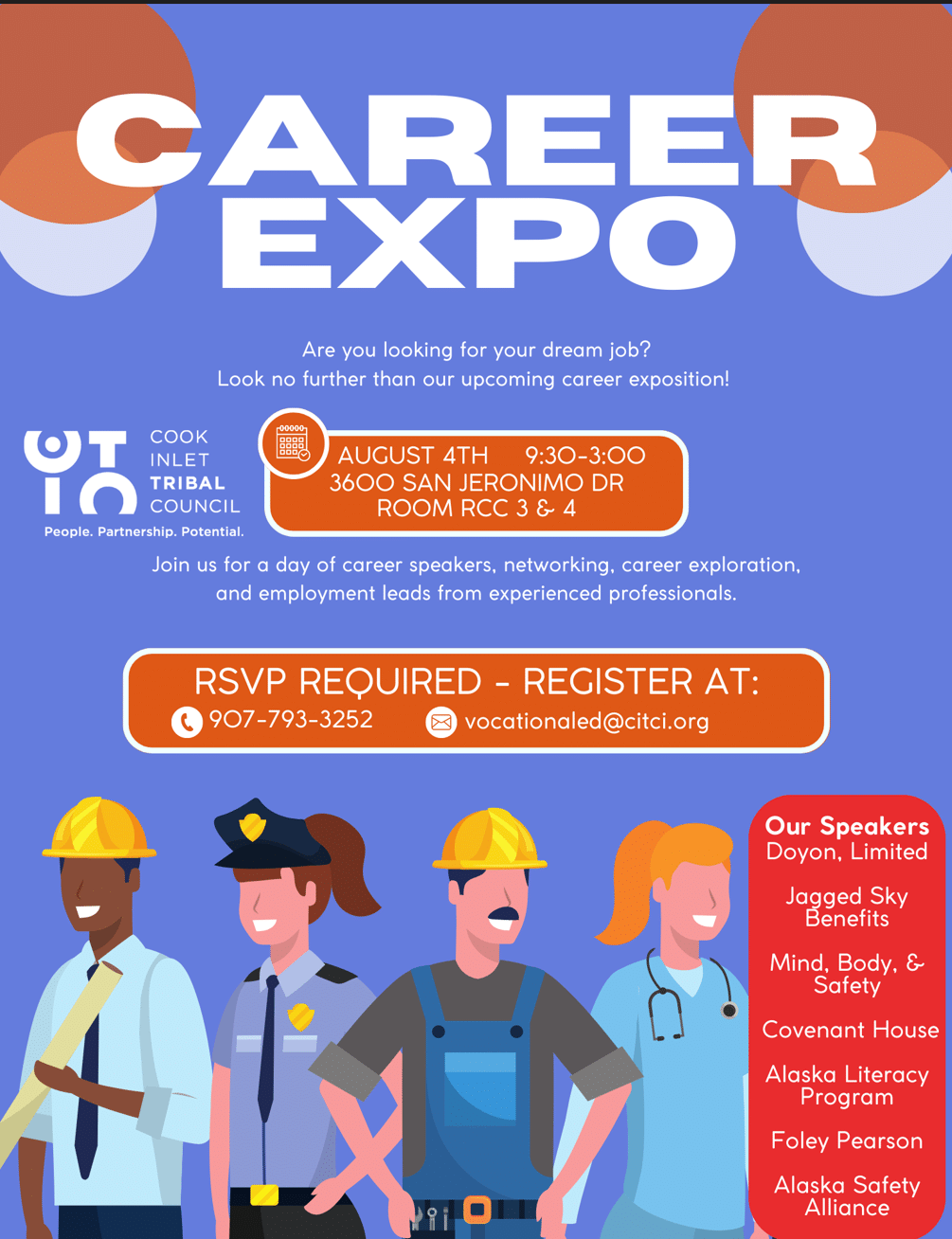
Looking for your dream job? Join us at our upcoming career expo and a day of speakers, networking and gathering leads from experienced professionals. Speakers include representatives from Doyon, Limited; Jagged Sky Benefits; Mind, Body, & Safety; Covenant House; Alaska's Literacy Program; Foley Pearson; Alaska... Join us every Friday morning for independent study. Click on the link or scan the QR code in the calendar below to join the Teams virtual classroom. Click the image to enlarge: This workshop allows individuals new to technology we explore Parts of a Computer, Using a Mouse, Internet Safety, and Internet Search Tips. Students will put what is learned into practice in the computer lab. This workshop helps participants learn the perks of typing, review the typing lesson dashboard, and explore the qwerty keyboard. We'll also learn typing tips and goal setting. Attendees will then sign up for typing.com and put what is learned into practice in the computer lab. |
0 events,
|